A complete guide to finding culturally equivalent idioms, expressions, and sayings across 15+ languages.
SearchGo DeeperGrammar & VocabIn ContextStudy HubIdiom of the DayFavouritesFree vs Pro
🔍
Searching for an idiom
1
Type any idiom, saying, slang, or expression in the search bar — in any supported language.
2
Select your source language and one or more target languages for the equivalents you want returned.
3
Tap "Find cultural equivalent" — IdiomBridge returns culturally equivalent expressions, not just word-for-word translations.
🏠 The home screen
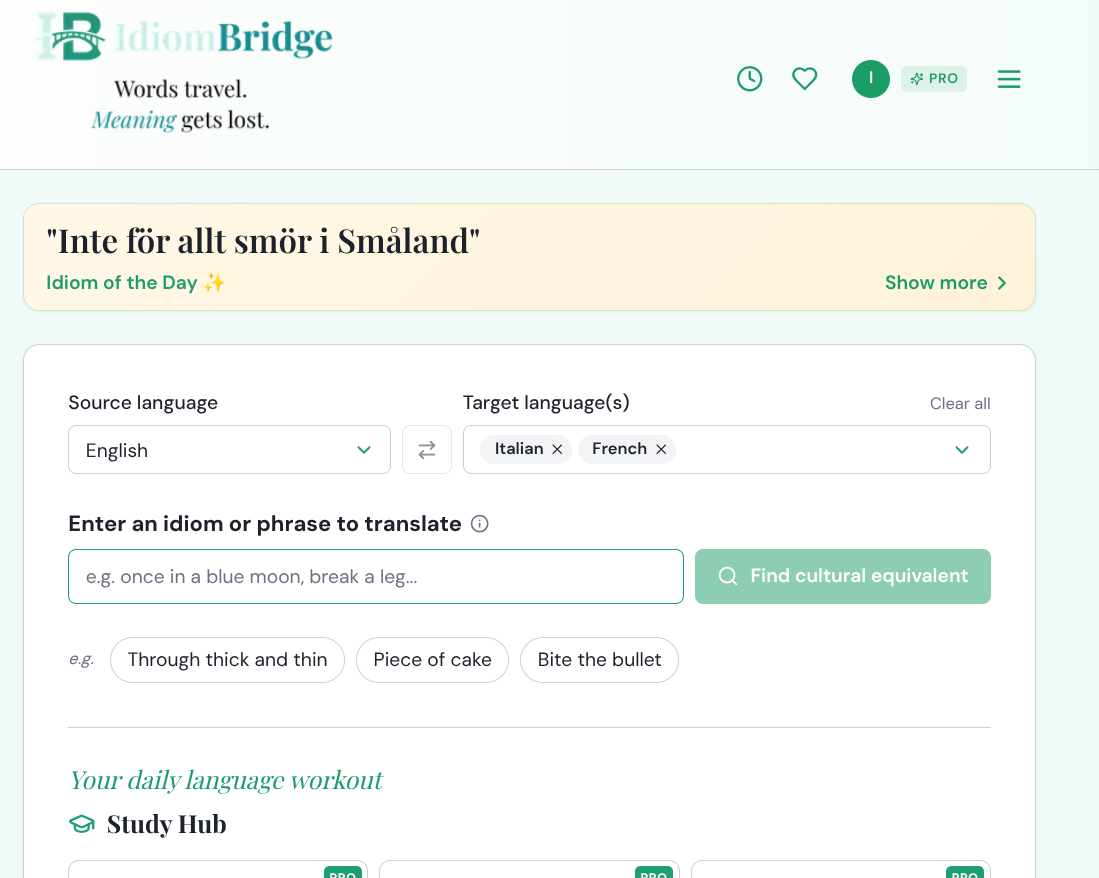
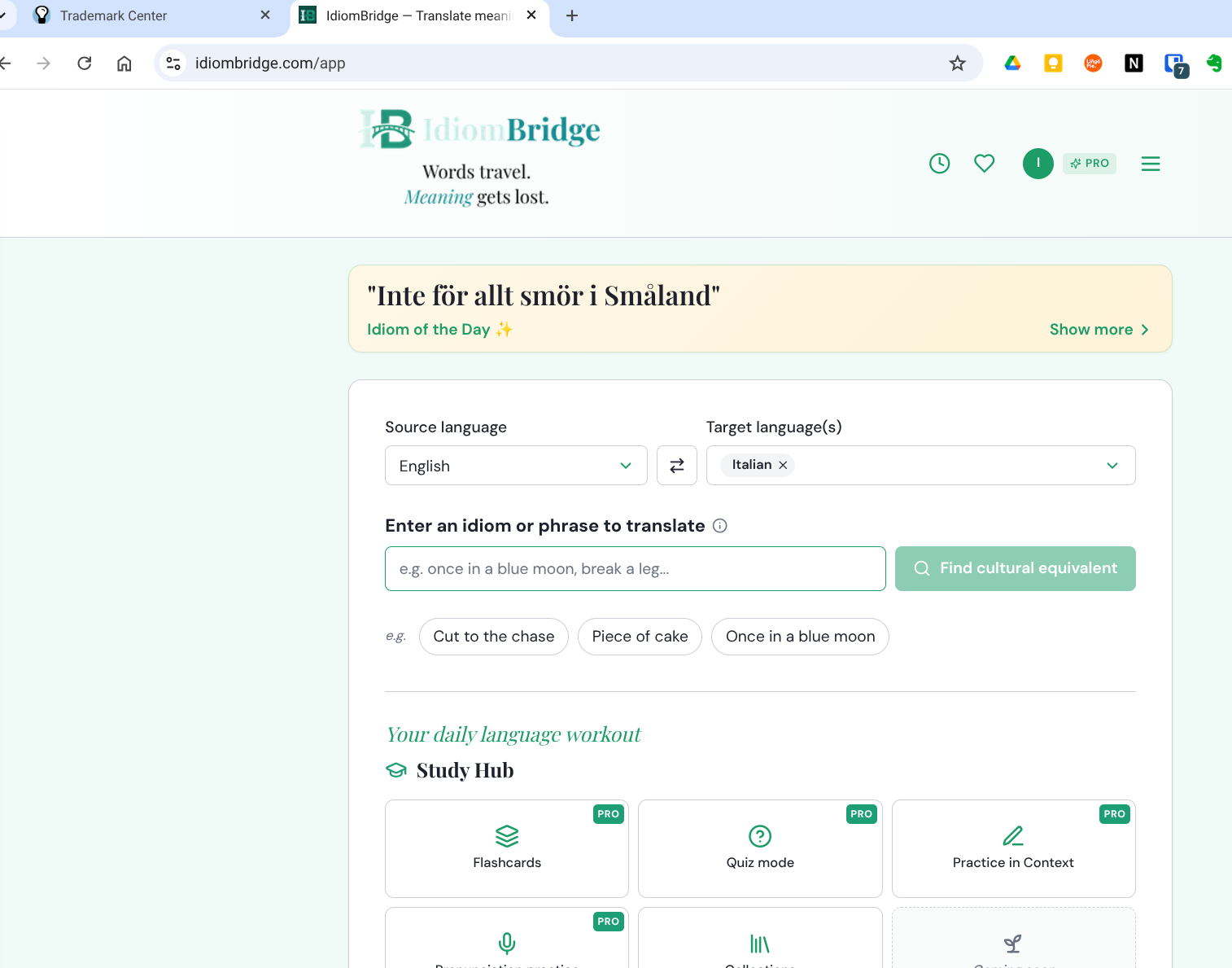
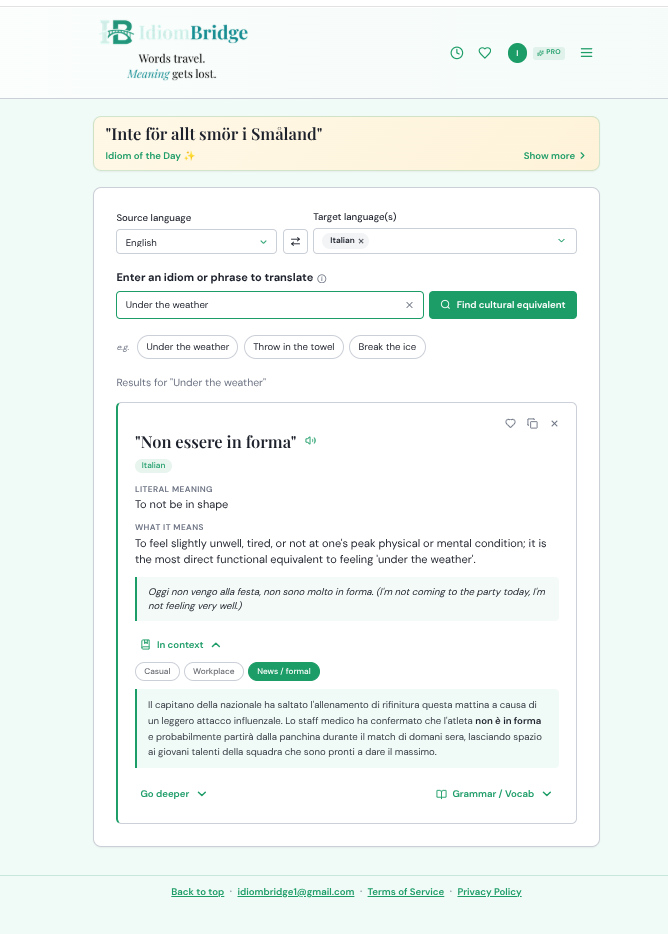
The IdiomBridge home screen. At the top: today's Idiom of the Day. Below: your source and target language selectors, the search bar, and quick-start example phrases. The Study Hub appears further down the page.
ℹ️ Search scope tooltip
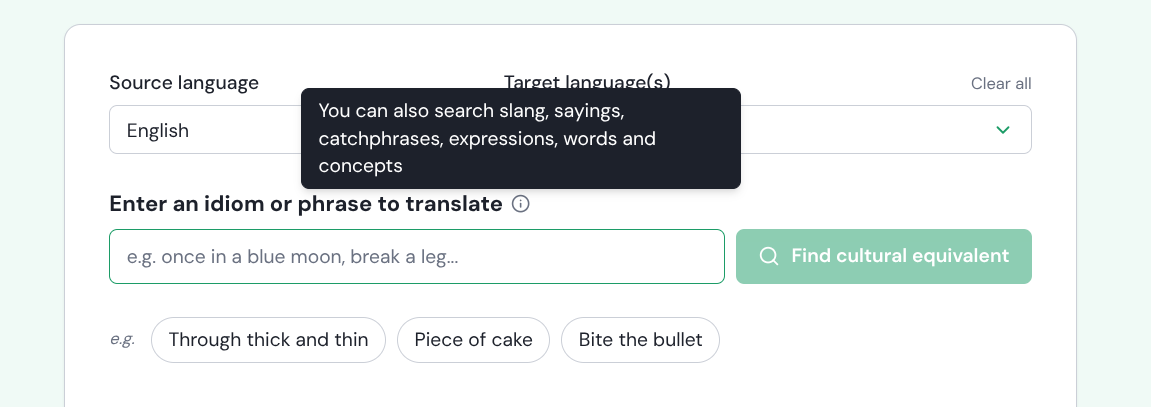
Hover the info icon next to the search label. IdiomBridge isn't limited to traditional idioms — slang, sayings, catchphrases, single words, and abstract concepts all work.
ℹ Idioms
Classic fixed expressions like "bite the bullet" or "spill the beans."
Cultural wisdom phrases, folk sayings, and traditional proverbs.
ℹ Concepts
Try searching an idea or feeling — IdiomBridge will suggest expressions that capture it.
⌨️ Typing a search
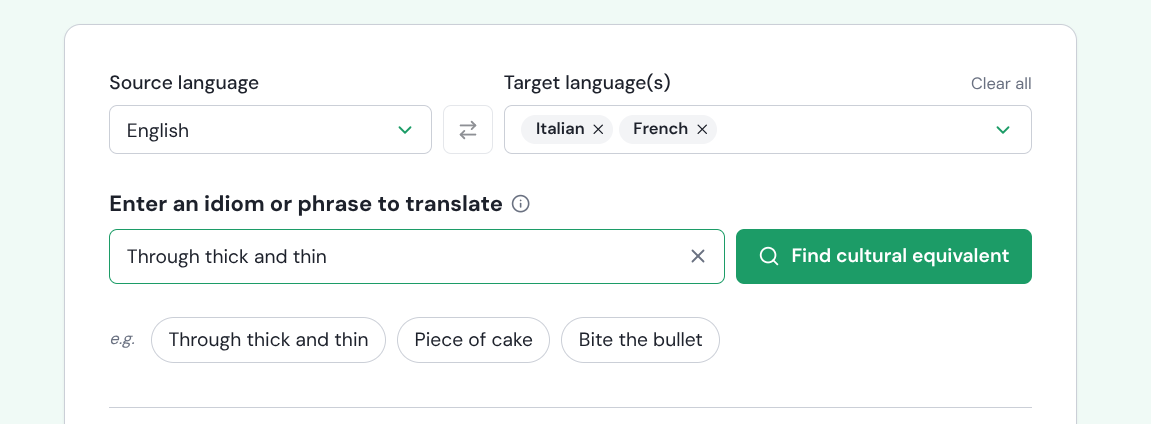
Type your idiom and hit "Find cultural equivalent." Here "Through thick and thin" is searched with Italian and French as targets — both results appear on the same page. Use the swap arrows to reverse source and target languages.
You can select multiple target languages at once. Each language gets its own result card so you can compare cultural equivalents side by side.
📋 Search results
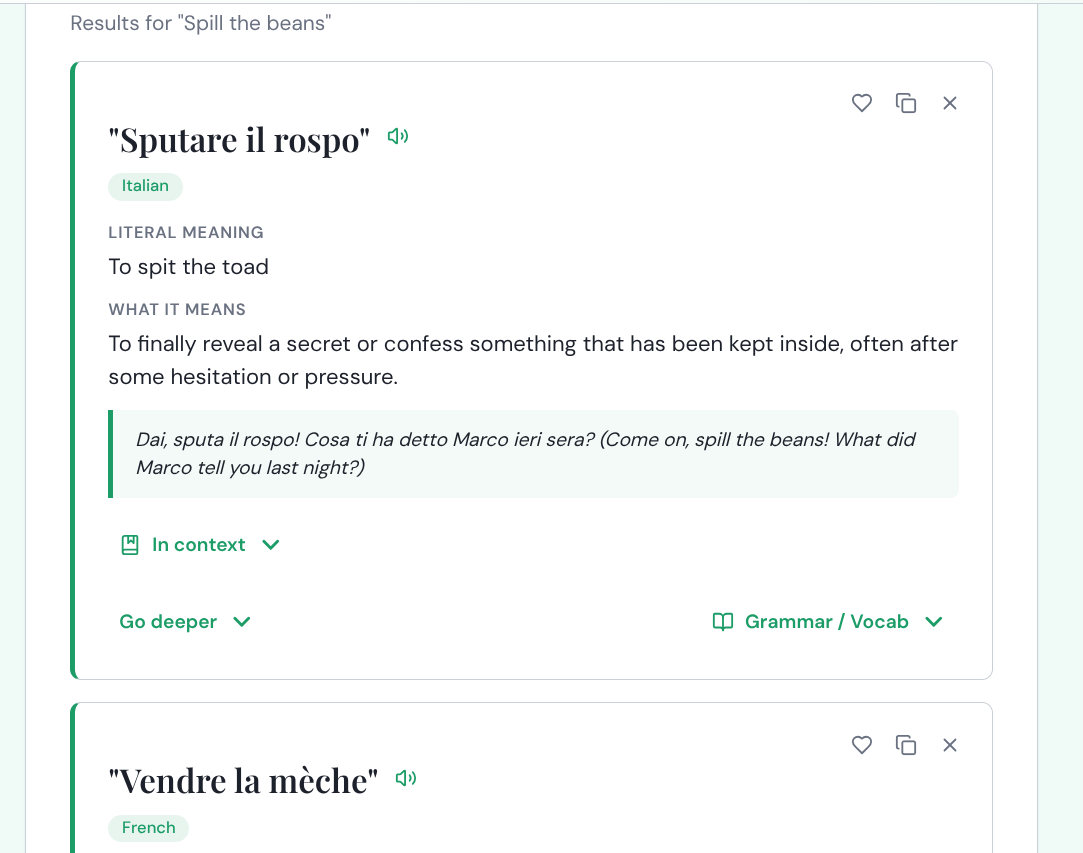
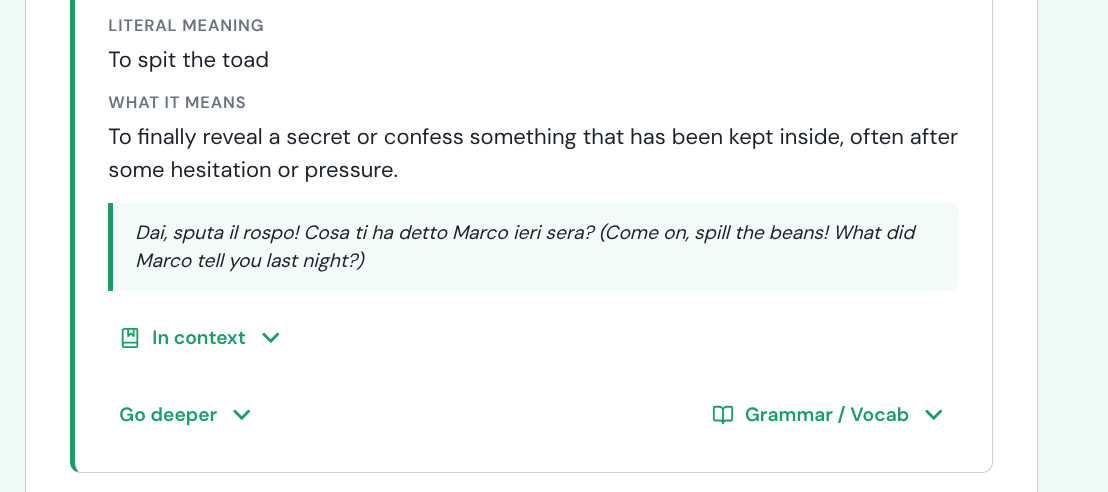
Results for "Spill the beans." Each card shows the culturally equivalent expression, its literal meaning, what it actually means, and a native example sentence. Icons at the top let you save to Favourites, copy, or dismiss the card.
🔎 Inside a result card
Each result card has three expandable sections at the bottom: "In context" for Casual / Workplace / Formal examples, "Go deeper" for cultural history and origin, and "Grammar / Vocab" for a word-by-word breakdown. The speaker icon plays native-speaker audio.
🌱 Beginner tip
Try the example phrase chips below the search bar — "Through thick and thin," "Piece of cake," "Bite the bullet" — a great way to see what a result looks like before searching your own phrase.
🚀 Power user tip
Select two or three target languages at once to get a cross-language comparison in a single search — ideal for translators or anyone learning multiple languages simultaneously.
☰
Navigation — the top bar & menu
🔝 The top navigation bar
The top bar gives quick access to everything. From right to left: the hamburger menu (three lines) opens full navigation, the PRO badge shows your plan, your avatar shows account details, the heart icon goes to Favourites, and the clock opens your search history.
ℹ 🕐 History
Revisit any previous search without retyping it.
ℹ ♥ Favourites
All your saved idioms — ready to study or export.
ℹ 👑 PRO badge
Shows your current plan. Tap to upgrade or manage your subscription.
ℹ ☰ Menu
Access Settings, Study Hub, How to Use, Upgrade to Pro, FAQ, and more.
📂 The hamburger menu
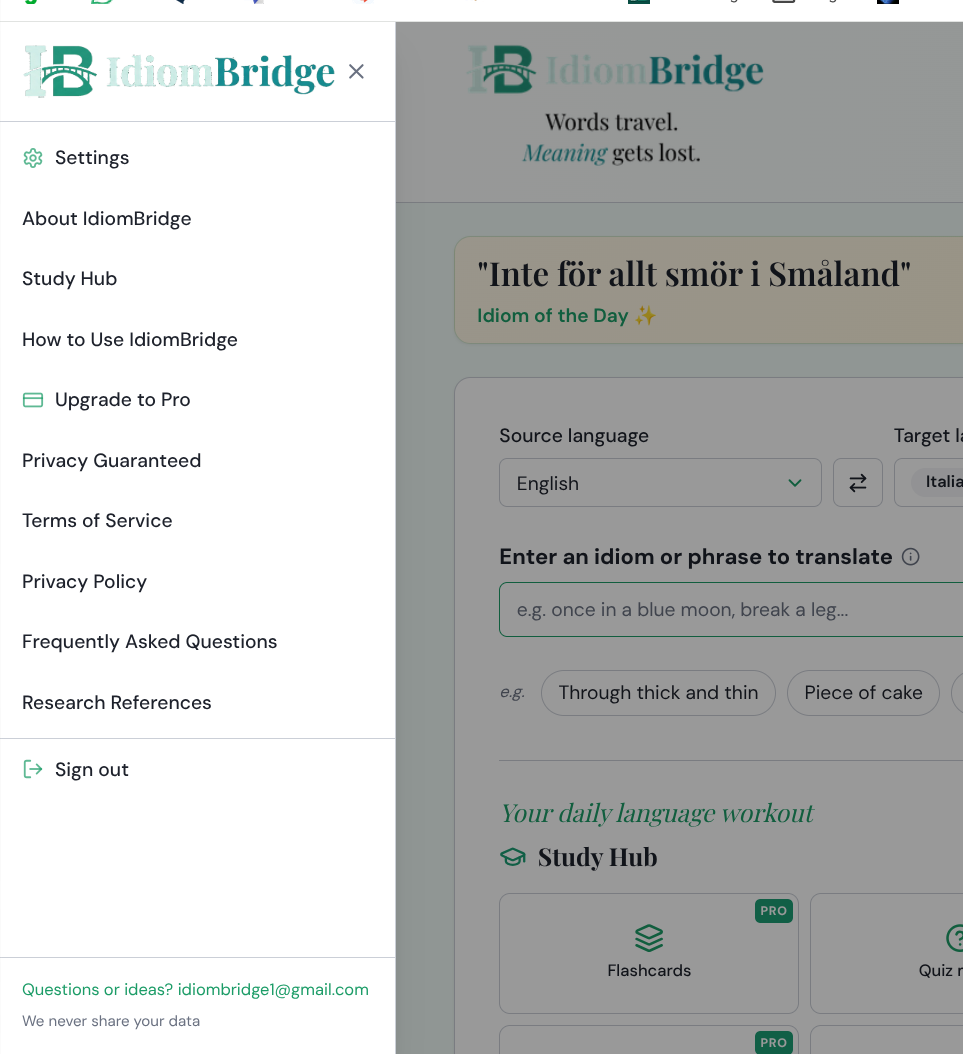
The full navigation panel. From here you can reach Settings, the Study Hub, FAQs, Research References, upgrade to Pro, and sign out. "Privacy Guaranteed" and "We never share your data" appear at the bottom.
🌱 Beginner tip
"How to Use IdiomBridge" in the menu opens a quick-start guide directly inside the app — a handy reference while you're getting started.
🚀 Power user tip
"Research References" links to the academic sources behind IdiomBridge's cultural and linguistic data — useful for teachers or researchers citing the platform.
⚙️
Settings
⚙️ Settings panel
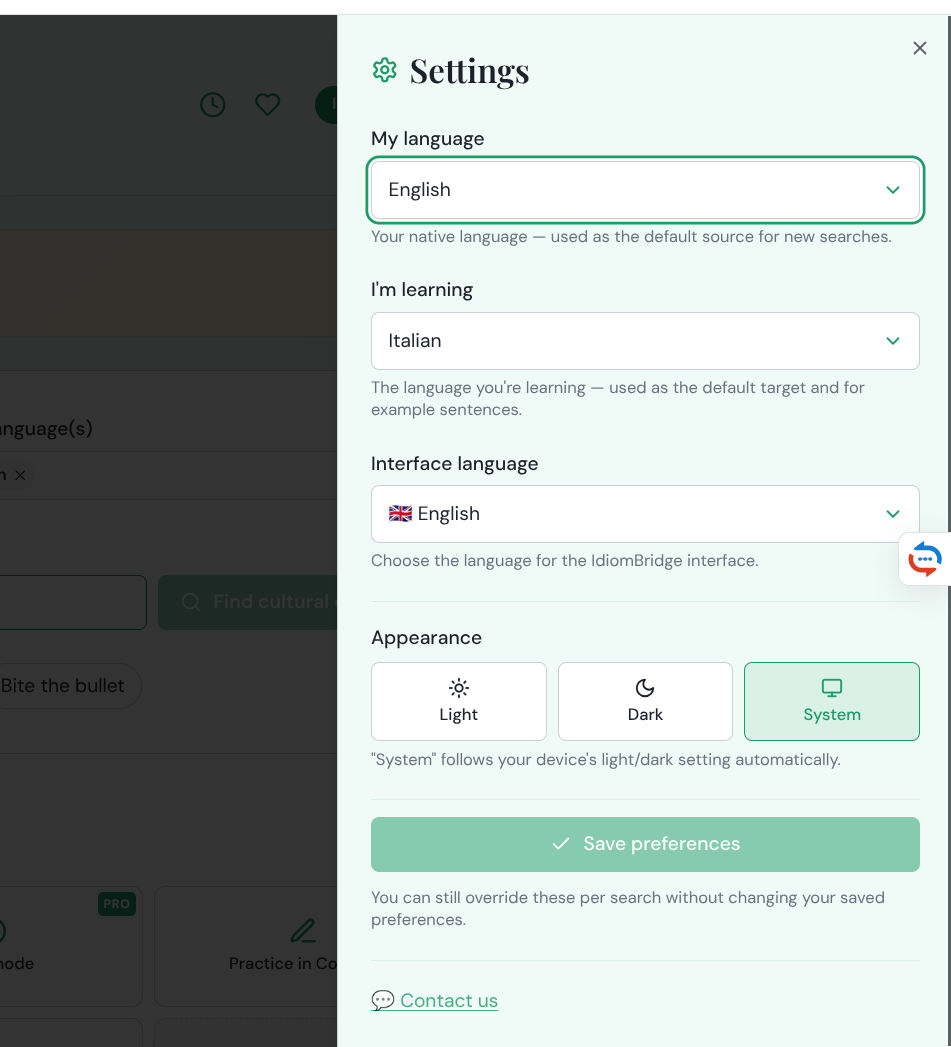
Open Settings from the hamburger menu. Three things to configure: "My language" sets your native language as the default source. "I'm learning" pre-fills your target language on every search. "Interface language" changes the app's own text — choose English, Italian, French, or Spanish. Appearance can follow your device's light/dark setting automatically if left on System.
You can always override the language selections per search without changing your saved preferences — useful when exploring a different language pair temporarily.
🌱 Beginner tip
Set "I'm learning" to your target language so the search bar always pre-selects it — no need to change it every time.
🚀 Power user tip
If you're learning two languages, leave "I'm learning" blank and add multiple targets directly in the search bar per search instead.
🔎
Go Deeper — cultural deep dives
📚 Go Deeper expanded
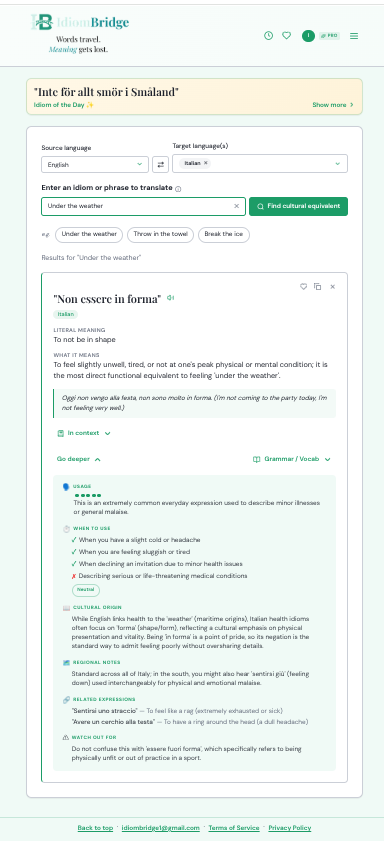
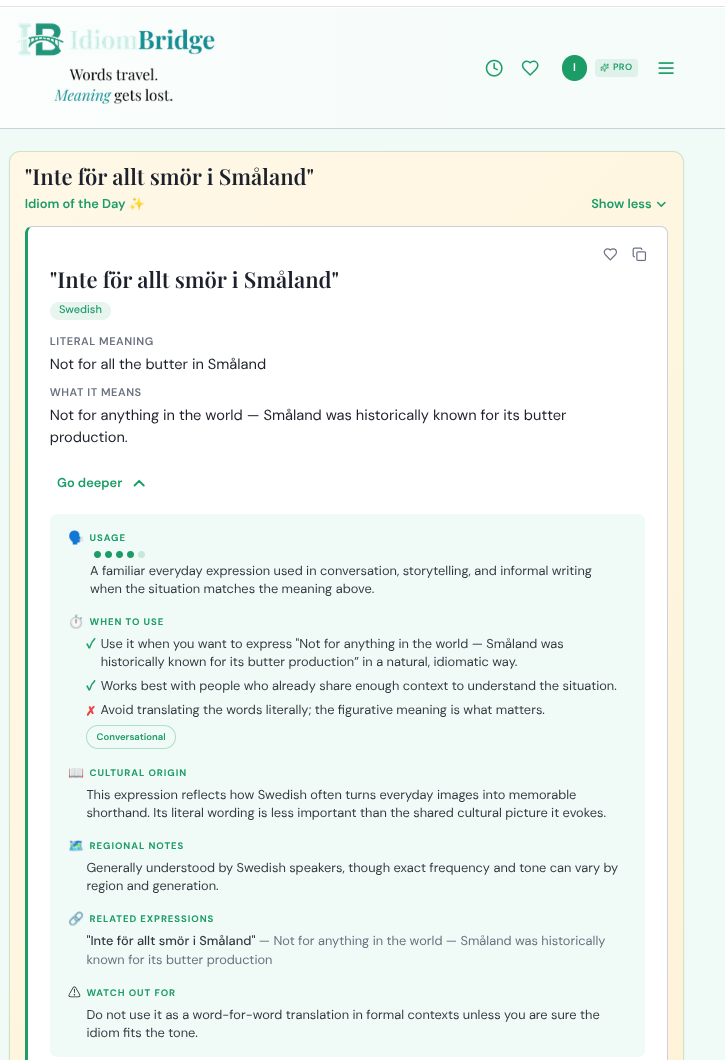
Tap "Go deeper" on any result card to expand this panel. Six sections: Usage (a frequency dot-rating), When to use (tick and cross guidance), Cultural Origin, Regional Notes, Related Expressions, and Watch Out For — flagging the most common mistakes learners make with this expression.
"Watch Out For" is particularly valuable — it flags easy mistakes like false cognates or expressions that sound similar but mean something very different.
ℹ Usage rating
The dot scale shows frequency — five dots means extremely common, one dot means rare or archaic.
ℹ Cultural Origin
The historical event, cultural practice, or metaphor that gave rise to the expression.
ℹ Watch Out For
The most common mistake learners make with this expression — don't skip this section.
🌱 Beginner tip
Check the Usage rating before committing an expression to memory — a one-dot idiom may be technically correct but rarely heard in modern speech.
🚀 Power user tip
Use Cultural Origin as conversation material — knowing the story behind an idiom is a great way to connect with native speakers who are often delighted anyone knows it.
📖
Grammar & Vocab
📖 Grammar & Vocab expanded
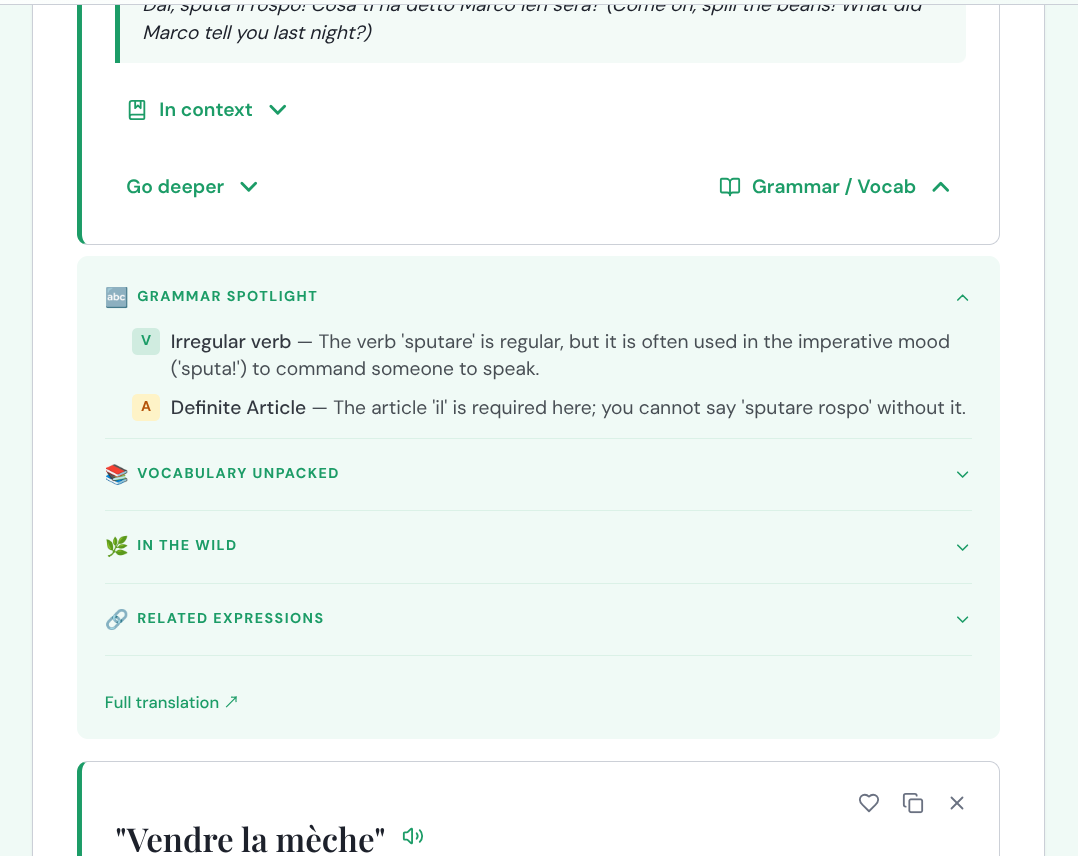
Tap "Grammar / Vocab" on any result card. Grammar Spotlight flags the tricky parts — irregular verbs, required articles, unusual word order — tagged by type (V for verb, A for article). Below it: Vocabulary Unpacked (word-by-word definitions), In the Wild (real native-speaker examples), and Related Expressions. "Full translation" at the bottom opens a complete linguistic breakdown.
🌱 Beginner tip
Start with Grammar Spotlight — it flags the exact parts most likely to trip up a learner, like required articles (e.g. the "il" in "sputare il rospo") that you simply can't drop.
🚀 Power user tip
Use Related Expressions to build topic clusters — search one idiom then explore its relatives to build a whole family of expressions around a single theme.
💬
In Context — Casual, Workplace, News/Formal
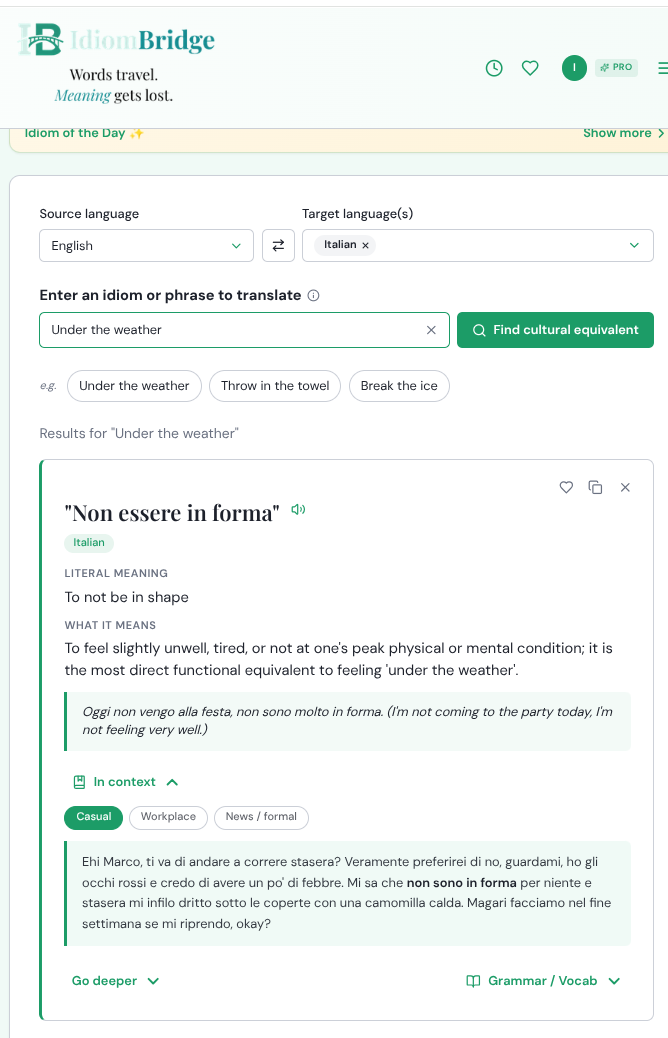
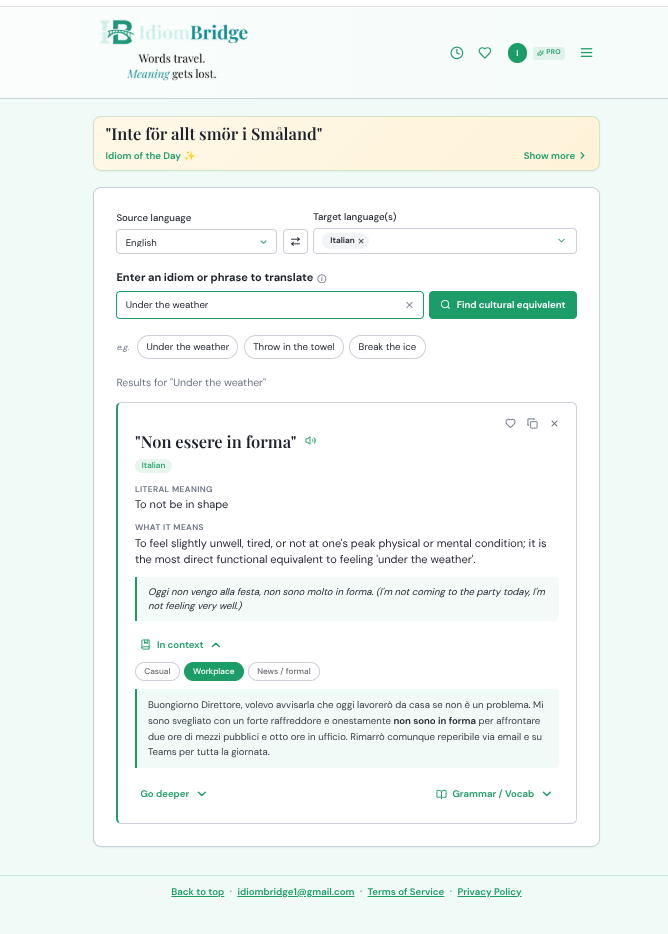
Tap "In context" on any result card to see the expression used in three real-world registers. The key phrase is highlighted in bold in each example.
💬 Casual context
The Casual tab shows everyday conversation — texts, messages to friends, informal speech. Use this register with people you know well.
💼 Workplace context
The Workplace tab shows the expression in a professional setting — emails, meetings, presentations. The tone is structured but still natural, not stiff or overly formal.
📰 News/Formal context
The News/Formal tab shows the expression in journalism or official writing — here, a sports news report. Useful for understanding how an expression shifts register across professional written contexts.
🌱 Beginner tip
Always read all three tabs before using an expression in writing — an idiom that sounds perfect in a casual text can sound out of place in a professional email.
🚀 Power user tip
The News/Formal examples are excellent reading practice — they model the vocabulary and sentence structure expected in formal written Italian, French, or Spanish.
🎓
Study Hub
🎓 Study Hub overview
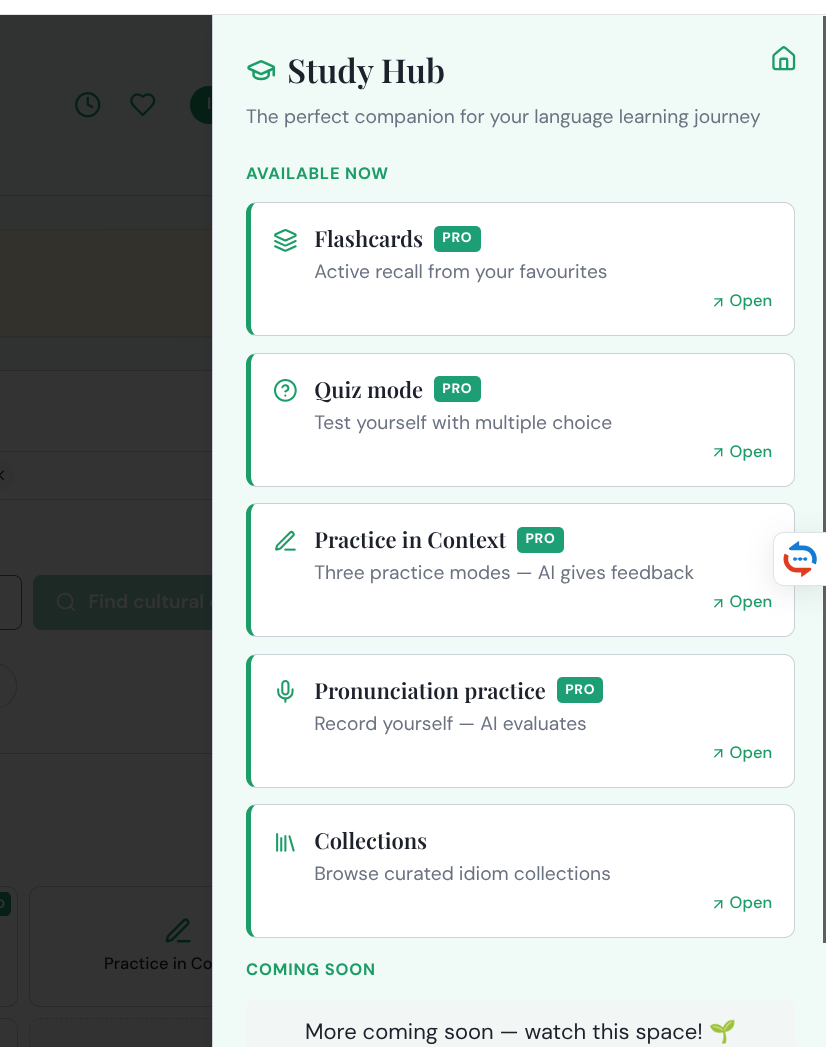
The Study Hub is your daily learning centre — access it from the hamburger menu or the shortcuts on the home screen. Five modes available now, with more coming soon.
🔲 Study Hub home screen shortcuts
The Study Hub shortcuts appear on the home screen under "Your daily language workout." Tap any icon to jump straight into that mode. PRO badges show which features require a Pro subscription.
🃏 Flashcards PRO
Build active recall from your saved idioms. Choose your source and language filter before each session.
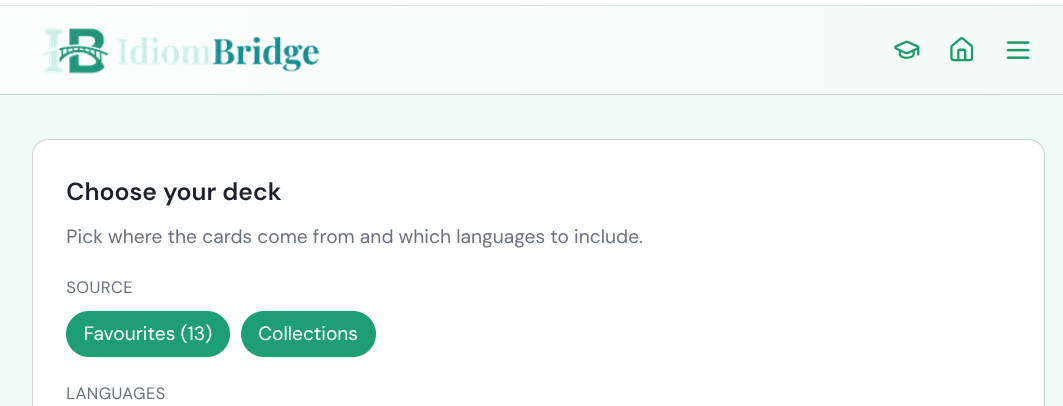
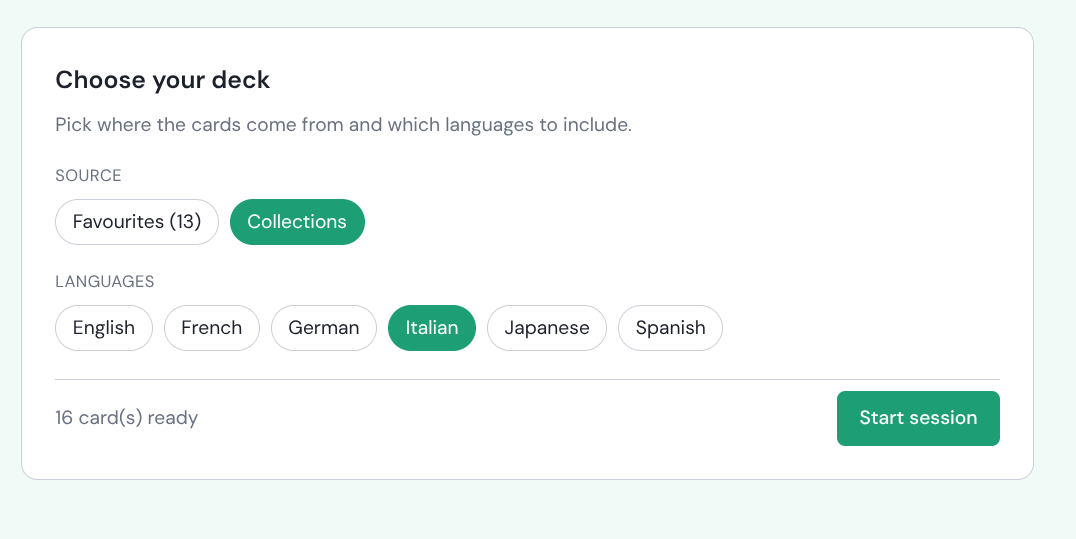
🃏 Choose your deck
Before each session choose your source — your own Favourites or a curated Collection — then filter by language. The card count updates live as you make selections. Hit "Start session" when ready.
The heart icon is your Study Hub fuel. Every idiom you save with the heart appears in Flashcards, Quiz mode, Practice in Context, and Pronunciation Practice. The more you save, the richer your study sessions. Free accounts can save up to 5 — Pro gives you unlimited.
🌱 Beginner tip
Start with a single language rather than all languages — it keeps sessions focused and stops you mixing up Italian and French equivalents early on.
🚀 Power user tip
Use Collections as your deck source when studying a specific topic — the curated sets are tighter and more thematically coherent than a general Favourites mix.
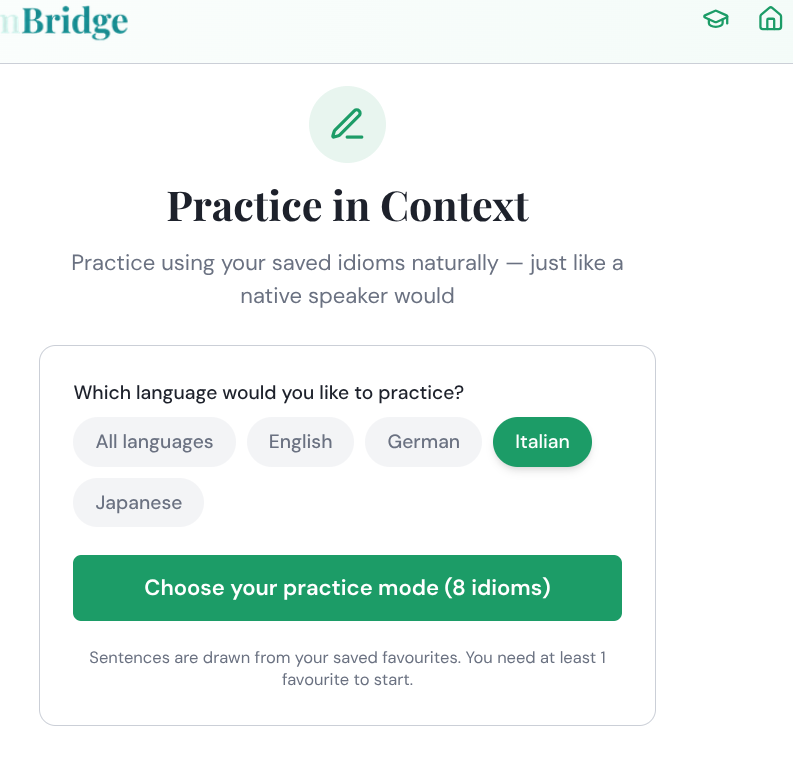
✏️ Practice in Context PRO
Practice using your saved idioms naturally in sentences — with AI feedback on your answers.
✏️ Practice in Context — start screen
Select your language then tap "Choose your practice mode" to pick from three AI-guided exercise types. Sessions draw from your saved Favourites — you need at least one saved idiom to begin. The number in brackets shows how many idioms are available in the selected language.
🌱 Beginner tip
Do Flashcards first to build recognition, then move to Practice in Context to test whether you can actually use the idioms in a real sentence.
🚀 Power user tip
The AI feedback goes beyond right/wrong — it explains why an answer works or doesn't, making it one of the most efficient ways to internalise natural usage.
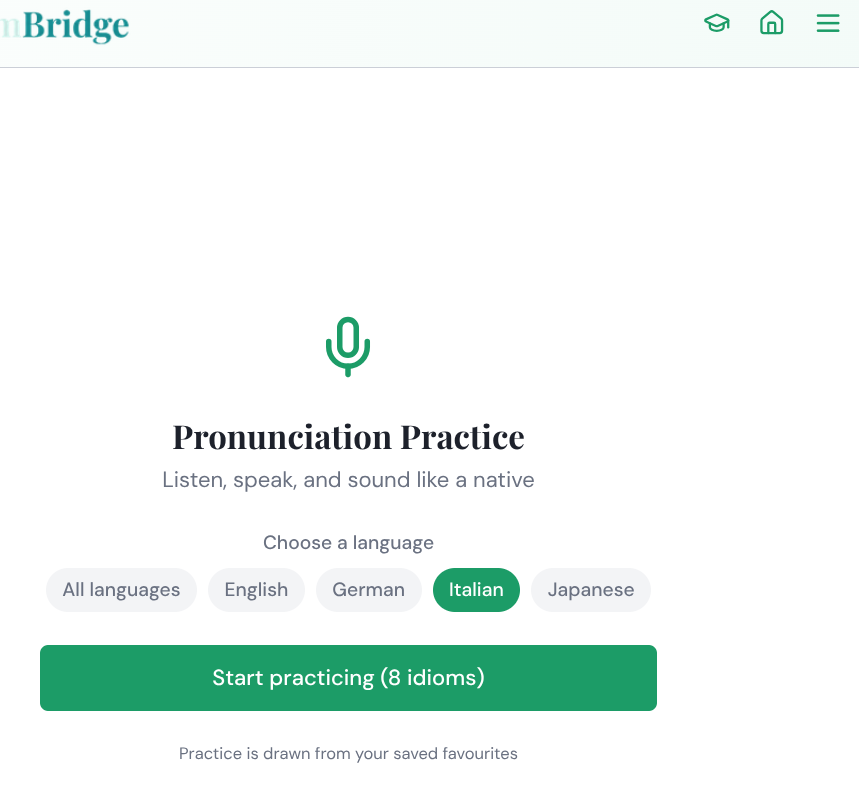
🎤 Pronunciation Practice PRO
Listen to native-speaker audio, record yourself, and get AI evaluation of your pronunciation.
🎤 Pronunciation Practice — start screen
Choose your language and tap "Start practicing." Sessions draw from your saved Favourites. The AI evaluates your recording and gives targeted feedback on specific sounds or stress patterns.
🌱 Beginner tip
Listen to the native audio at least twice before recording yourself — focus on rhythm and stress patterns, not just individual sounds.
🚀 Power user tip
Save idioms specifically because you want to practice their pronunciation — build a dedicated "hard sounds" pool in Favourites to use as your practice set.
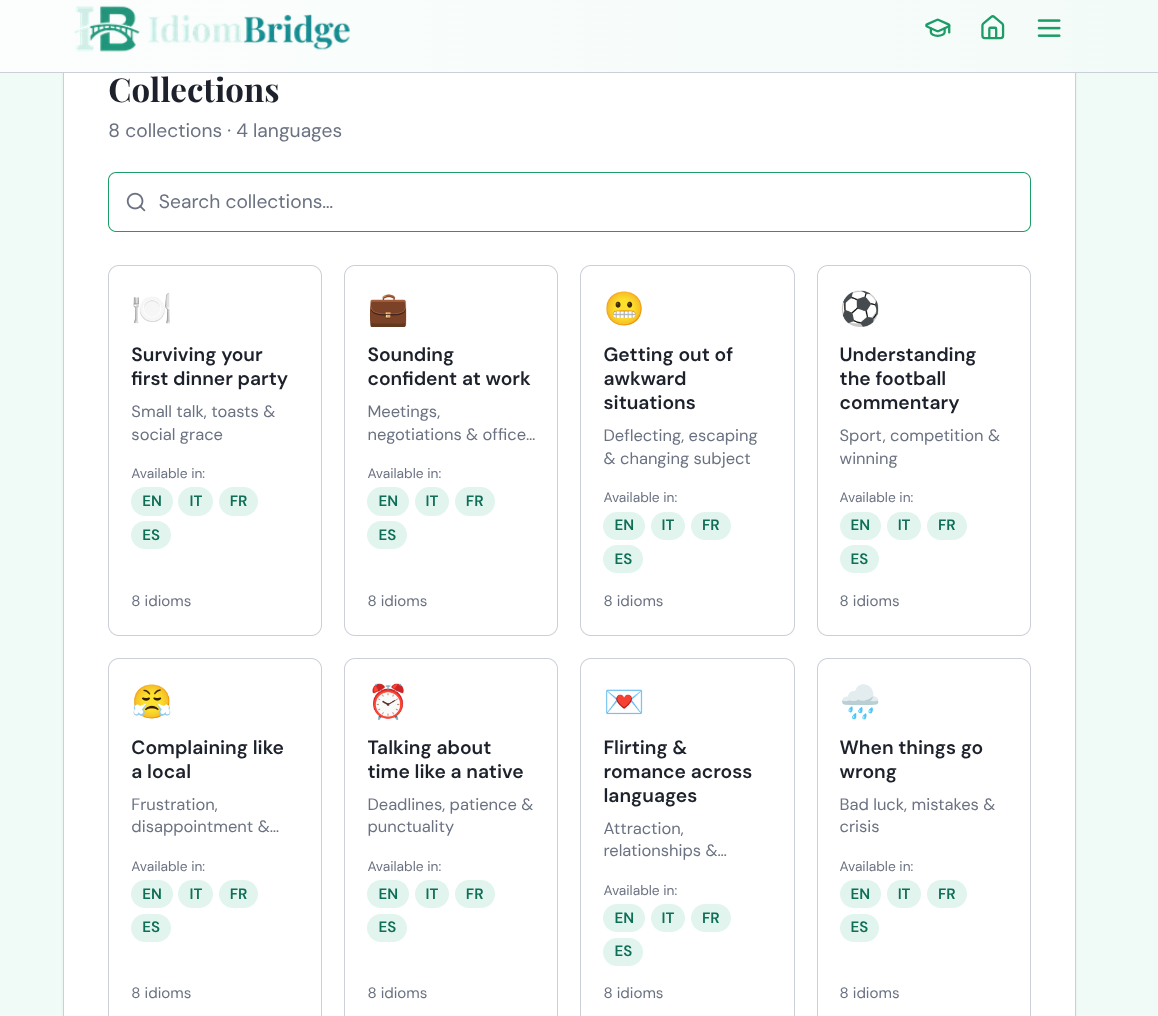
📚 Collections
Curated themed sets of idioms across multiple languages — ready to browse, search, and study.
🗂️ Collections — full grid
8 curated collections, each covering a real-world situation. Every collection is available in English, Italian, French, and Spanish — 8 idioms per collection. Use the search bar at the top to find collections by keyword.
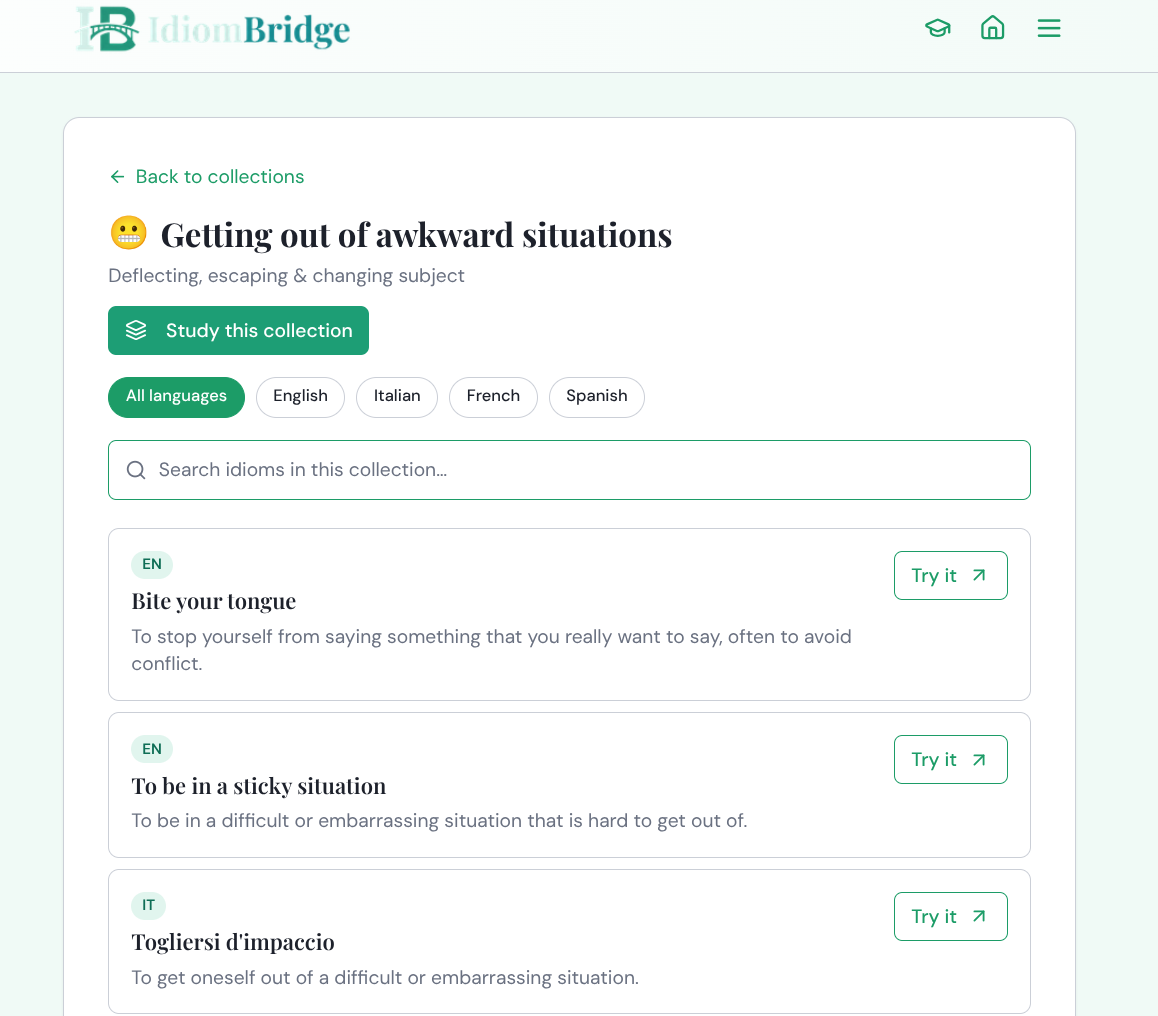
📋 Inside a collection
Inside a collection you can filter by language, search within the set, and tap "Try it" on any idiom to see its full cross-language equivalents immediately. "Study this collection" launches a Flashcard session with the whole set.
🌱 Beginner tip
Pick a collection that matches something you'll actually do soon — "Surviving your first dinner party" or "Sounding confident at work" — so the idioms feel immediately useful.
🚀 Power user tip
Use "Try it" inside a collection to deep-dive any idiom — you get the full result card with Go Deeper, Grammar/Vocab, and In Context without leaving your study flow.
📅
Idiom of the Day
✨ Idiom of the Day — expanded
The Idiom of the Day banner sits at the top of the home screen every day. Tap "Show more" to expand the full result card — literal meaning, what it means, and all the deep-dive sections. Today's idiom is the Swedish "Inte för allt smör i Småland" (Not for all the butter in Småland) — equivalent to "not for anything in the world," rooted in Småland's historical reputation as a butter-producing region.
The Idiom of the Day is drawn from across all 15+ supported languages — not just your target language. A great way to discover expressions from languages you might not otherwise explore.
🌱 Beginner tip
Make a habit of tapping "Show more" each morning — reading the Cultural Origin and When to Use section takes under a minute and builds strong passive vocabulary over time.
🚀 Power user tip
Save any Idiom of the Day with the heart icon — it goes straight into your Favourites and becomes immediately available for all Study Hub modes.
♥
Favourites
♥ Favourites panel
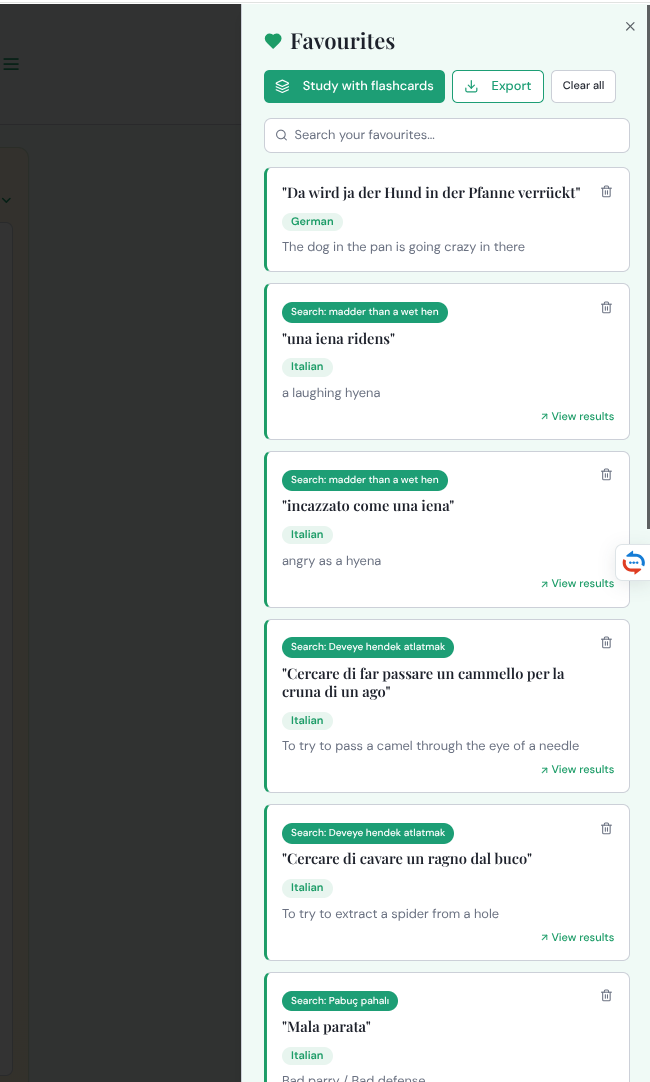
Access Favourites by tapping the heart icon in the top navigation bar. Every saved idiom shows the original search term that found it (green badge), the expression, its language, and literal meaning. Tap "View results" to jump back to the full result. Three actions at the top: "Study with flashcards" launches a session directly from your Favourites, "Export" opens the export menu, and "Clear all" removes everything.
The heart icon is your Study Hub fuel. Every idiom you save appears in Flashcards, Quiz mode, Practice in Context, and Pronunciation Practice. The more you save, the richer your study sessions become. Free accounts can save up to 5 — Pro gives you unlimited.
⬇️ Export your favourites
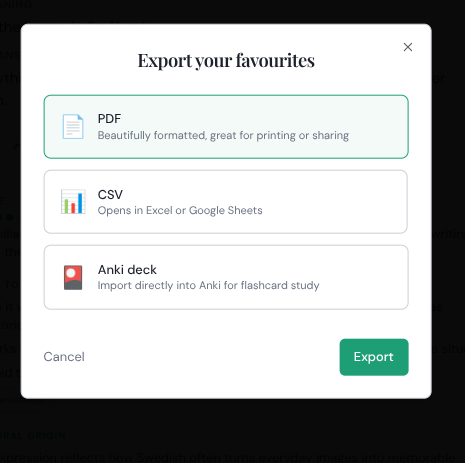
Tap "Export" in your Favourites to choose a format: PDF (a beautifully formatted reference sheet, great for printing or sharing with a teacher), CSV (opens in Excel or Google Sheets), or Anki deck (exports as a ready-to-import .apkg file). Select your format and tap Export.
ℹ PDF
Beautifully formatted — great for printing or sharing with a language tutor or teacher.
ℹ CSV
Opens in Excel or Google Sheets for sorting, filtering, or importing into other tools.
ℹ Anki deck
Exports as .apkg — ready to import into Anki. Includes expression, equivalent, cultural note, and example sentence on each card.
🌱 Beginner tip
Export as PDF and share it with your language teacher — it gives them an instant overview of what you've been studying and can guide your next lesson.
🚀 Power user tip
Export to Anki regularly to keep your SRS deck in sync — every new idiom you favourite becomes an Anki card without any manual creation. Build the habit of exporting weekly.
⭐
Free vs Pro
📊 Plan comparison
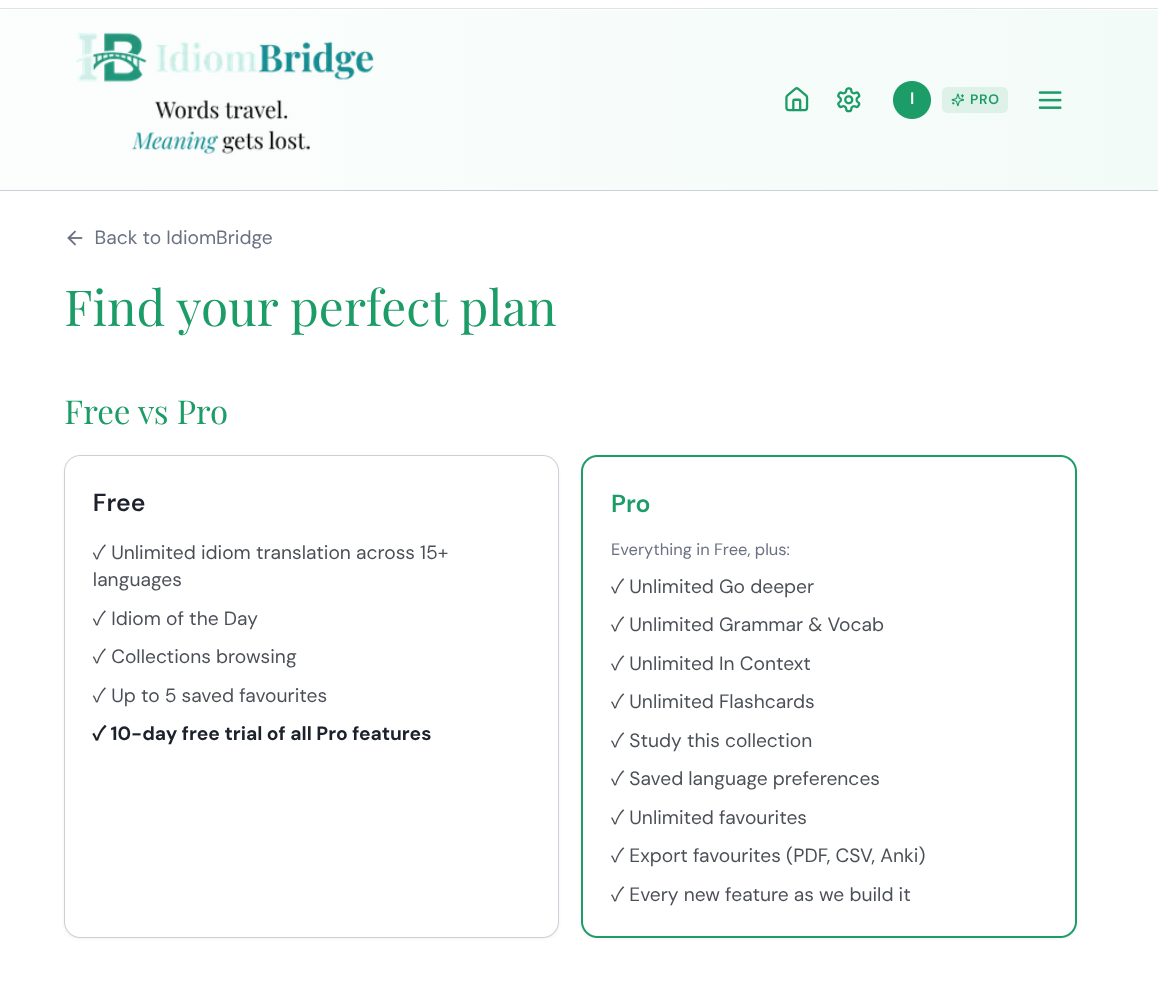
The full plan comparison — accessible via "Upgrade to Pro" in the hamburger menu. Free gives you unlimited idiom search, the Idiom of the Day, Collections browsing, and up to 5 saved Favourites. Pro unlocks every deep-dive and study feature, plus every new feature added in future at no extra cost.
🎁 Free
✓Unlimited idiom search across 15+ languages
✓Idiom of the Day
✓Collections browsing
✓Up to 5 saved Favourites
✓10-day free trial of all Pro features
👑 Pro
✓Everything in Free, plus:
✓Unlimited Go deeper
✓Unlimited Grammar & Vocab
✓Unlimited In Context
✓Unlimited Flashcards
✓Study this collection
✓Saved language preferences
✓Unlimited Favourites
✓Export to PDF, CSV & Anki
✓Every new feature as it's built
🌱 Beginner tip
Start the 10-day Pro trial immediately — it costs nothing and lets you experience every feature before deciding.
🚀 Power user tip
"Every new feature as we build it" means Study Hub "Coming soon" features are included in your Pro subscription the moment they launch.